Trending...
- UK Financial Ltd Audits Full Ethereum Architecture Verifies Corporate Wallets and 19-Token Ecosystem Ahead of CoinMarketCap Filing for Global Ranking
- Milton Collier, CEO & President of Freight Broker 911, Eliminates the #1 Barrier to Entry in Logistics: Announces 100% Free Freight Broker Training
- Buzzblender Announces Launch of Simple Hotel Mode for Android and Upcoming Video Wall Support for Samsung Professional Displays
New macOS app converts high-res video and Spatial Audio into Apple Immersive Video (.aivu) files for Apple Vision Pro
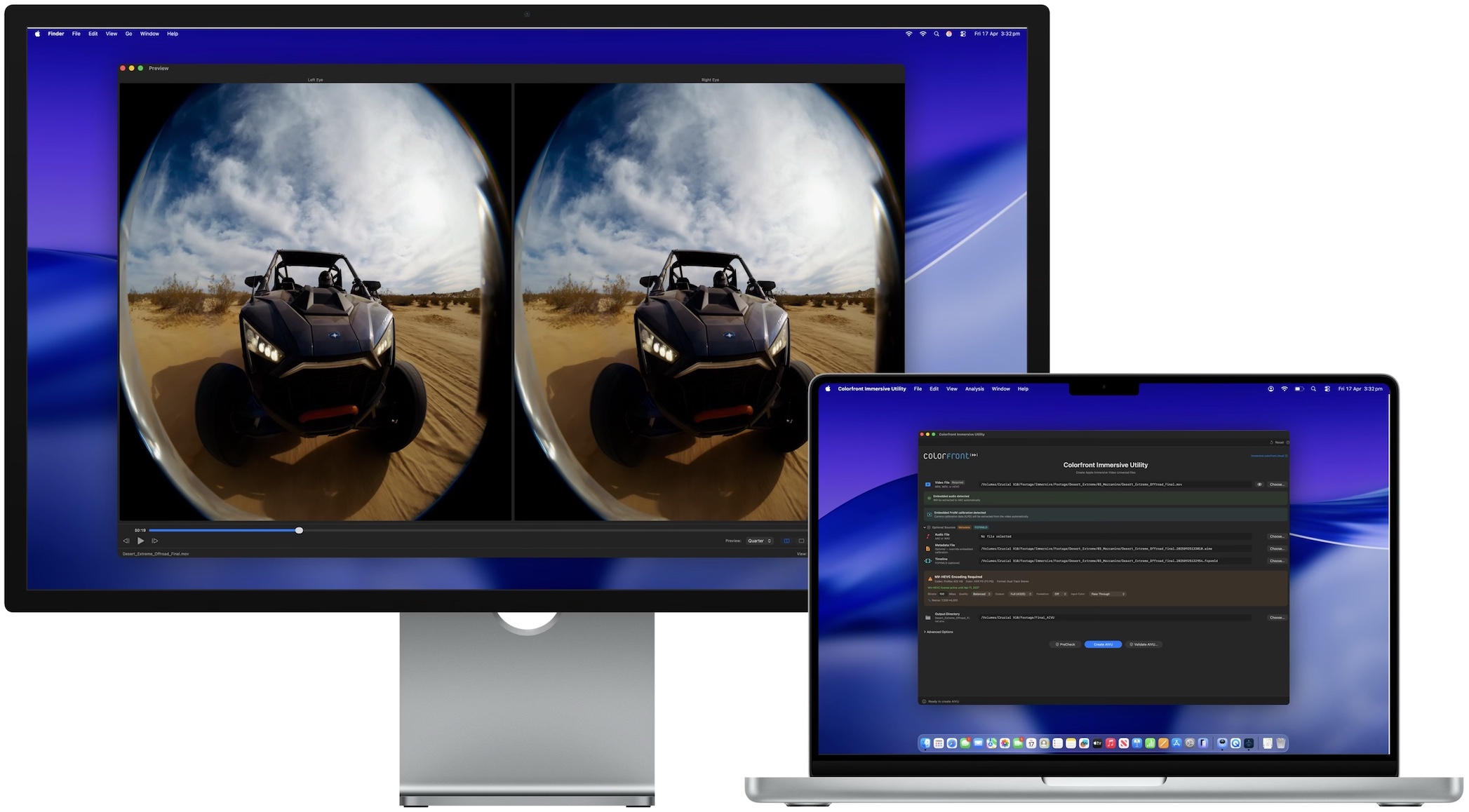
LOS ANGELES - ncarol.com -- Colorfront today announced Colorfront Immersive Utility, a new macOS app that creates Apple Immersive Video files (.aivu) for playback on Apple Vision Pro. The app accepts video in ProRes, MV-HEVC, and other standard formats, pairs it with Spatial Audio and camera metadata, and outputs a single AIVU file ready for distribution.
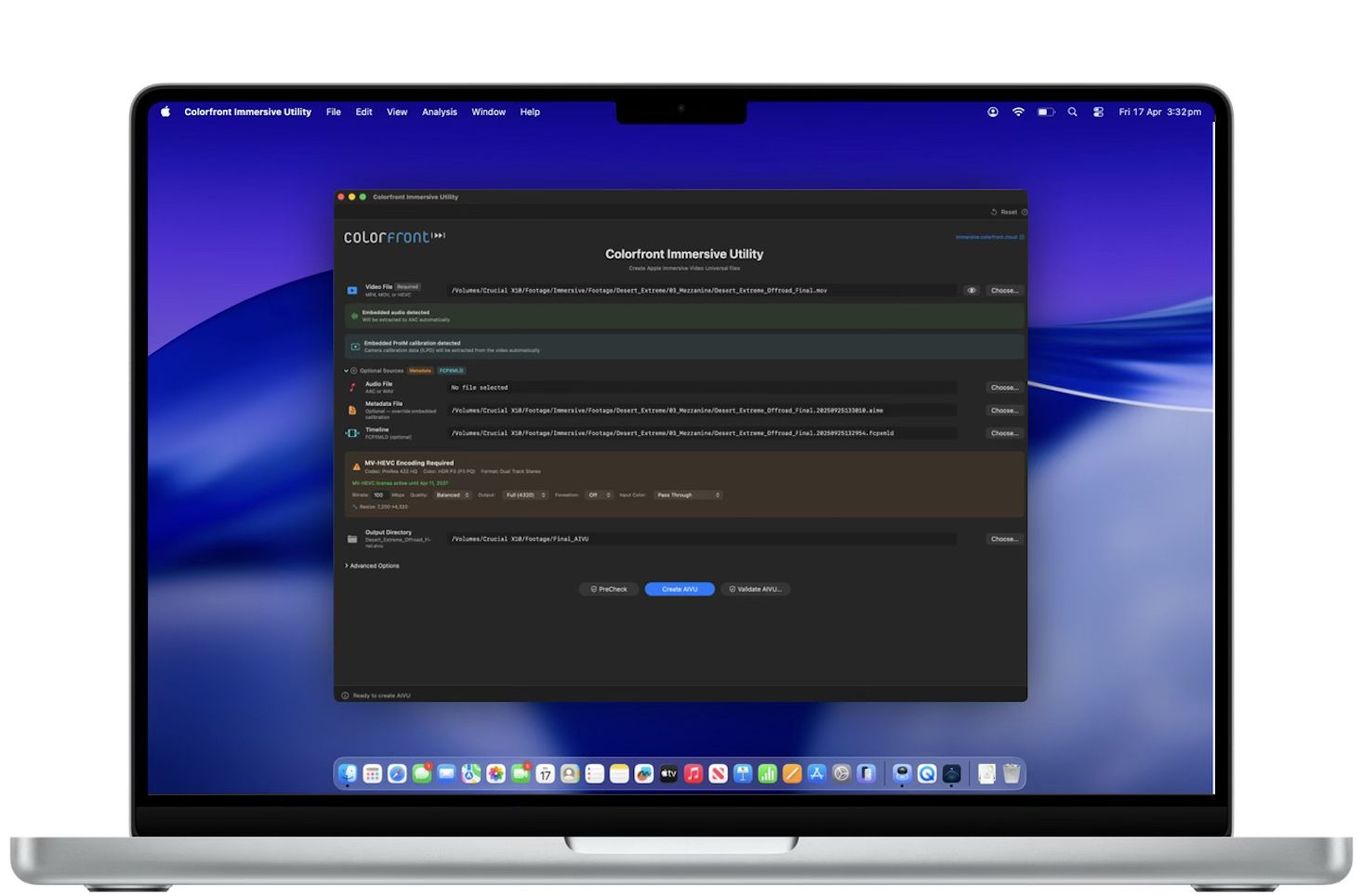
Colorfront Immersive Utility streamlines the process for preparing immersive video content for Apple Vision Pro with a single app. Users select a video file, a metadata file containing camera intrinsics, and an output directory. The app can also auto-detect ILPD calibration data embedded directly in the source video, so a separate metadata file isn't always required. From there, users simply click Create AIVU, and the app handles encoding, audio extraction, and packaging automatically.
"We built Colorfront Immersive Utility to put immersive video production into the hands of every type of creative, whether you're a filmmaker, a documentarian, or a brand telling a story in a completely new medium," said Mark Jaszberenyi, Co-Founder of Colorfront. "Apple Vision Pro has opened up an incredible storytelling canvas, and we wanted to expand access to these tools to as many creatives as possible. The entire pipeline runs on Mac devices with Apple silicon using Metal, so users can go from camera originals to a finished Apple Immersive Video experience."
GPU-accelerated MV-HEVC encoding
When the source video is ProRes or another non-HEVC format, Colorfront Immersive Utility encodes it to MV-HEVC using a GPU-accelerated Metal pipeline. Users can set the bitrate anywhere from 0 to 150 Mbps, choose from six quality/performance presets, and output at full 4320p (4320 x 4320 per eye) or half 2160p resolution. A Lanczos-3 resampling filter handles any resolution conversion needed.
Foveation is built into the same GPU pass. It allocates more resolution to the center of the frame, where the viewer typically looks, while gradually reducing resolution toward the edges. Three levels are available (1.25x, 1.5x, and 2.0x center magnification), and because foveation is integrated directly into the Lanczos resampling filter, there is no additional quality loss from a second processing step.
More on ncarol.com
Color space conversion is automatic. The app reads the video's embedded color metadata (NCLC/CICP tags) and converts to P3 D65 PQ at 108 nits, the target color space for Apple Immersive Video. Manual overrides are available for SDR BT.709, HDR10 BT.2020, and other source formats. The entire encoding pipeline processes video at 10-bit precision.
Spatial audio with APAC conversion
Colorfront Immersive Utility automatically detects and extracts embedded audio tracks from the source video to AAC. When a separate WAV file is provided instead, the app converts it to Apple Positional Audio Codec (APAC) for spatial playback on Apple Vision Pro. Three APAC bitrate tiers are available: 384 kbps, 512 kbps (default), and 768 kbps. A configurable fade-in (0 to 60 seconds) can be applied at the beginning of the file.
Multi-shot AIVU with Final Cut Pro XML timelines
The app supports multi-shot AIVU files through Final Cut Pro XML timeline import. Each shot in the timeline references a camera ID, start time, and duration. During AIVU creation, shot boundaries are encoded as setCamera presentation commands in the output file, so Apple Vision Pro can switch between camera perspectives automatically during playback.
Source PreCheck
Before starting any encode, users can run Source PreCheck, a pre-flight validation tool that analyzes video, audio, metadata, and timeline files for potential issues without beginning the creation process. PreCheck grades results by severity: errors that block AIVU creation, warnings worth reviewing, and informational notes. Results are grouped by category (Video, Audio, Metadata, Compatibility). Source PreCheck is available without a license.
Result validation and light level analysis
After an AIVU file is created, the app can validate it with a GPU-accelerated light level analysis that measures MaxCLL, MaxFALL, AvgFALL, and other metrics on every frame of the video. For stereo MV-HEVC content, left and right eye layers are analyzed independently. The validation flags frames that exceed the 108-nit maximum brightness of the Apple Vision Pro display. A parallel analysis mode splits the file in two halves and analyzes them concurrently for roughly 2x faster processing.
More on ncarol.com
Validation results can be exported as a multi-page PDF report with light level graphs, shot lists with thumbnails, and the brightest frames from the video. Additional analysis tools include PSNR/SSIM quality metrics for comparing source and encoded files, with per-eye breakdown and overlay charts for stereo content. The app also integrates with Apple Video Quality Tool (AVQT) for no-reference quality scoring of the main eye when AVQT is installed.
Real-time GPU preview
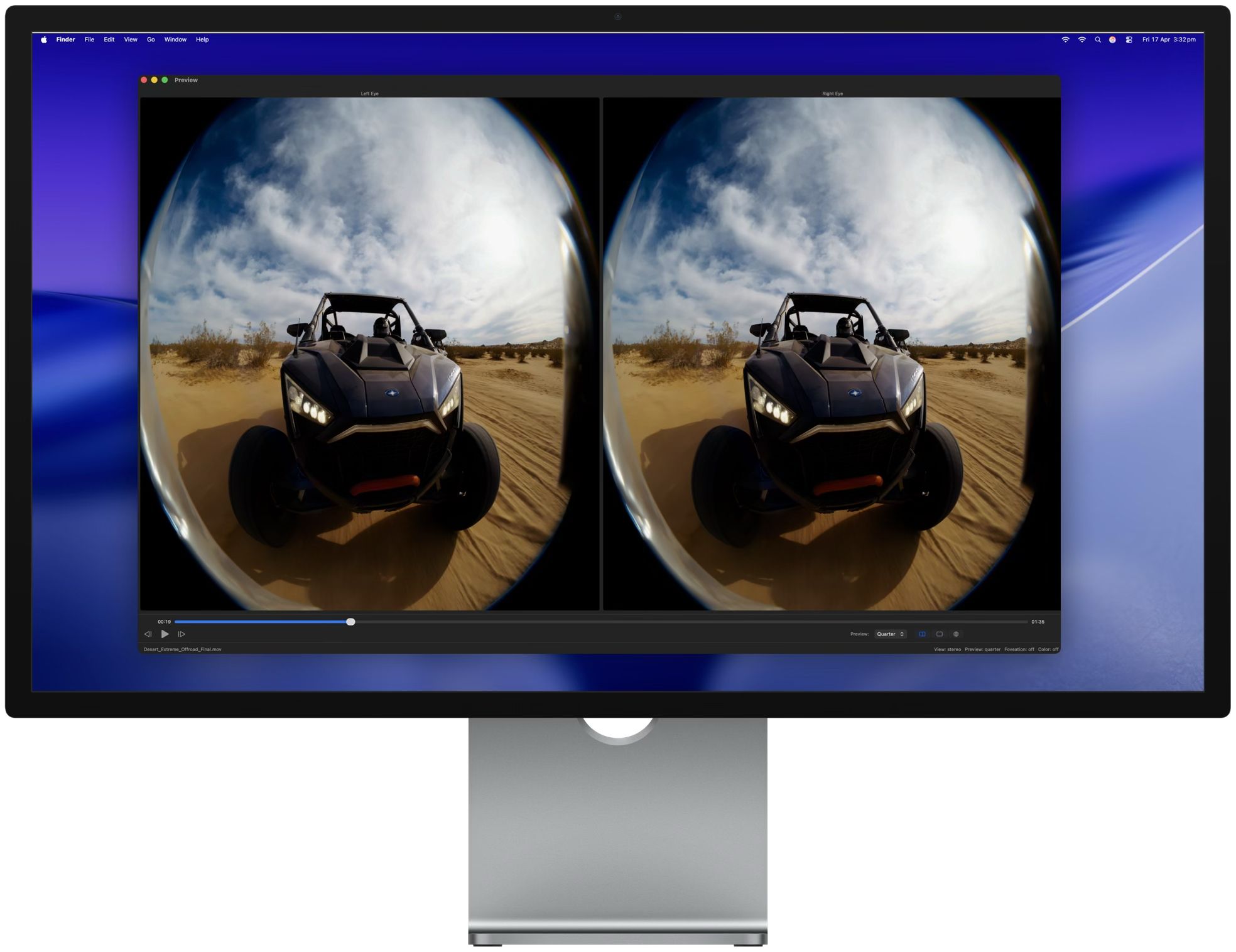
A built-in preview window provides real-time GPU-accelerated playback of the processed video. The preview is synchronized with the main window settings, so changes to foveation level, color space, or other parameters are reflected immediately. View modes include stereo (dual eye), single eye (left or right), and an immersive perspective view. Preview quality can be set to full, half, or quarter resolution.
Pricing and availability
Colorfront Immersive Utility is available today on the Mac App Store. It requires macOS 26.0 (Tahoe) or later, a Mac with Apple silicon (M1 or later required), and at least 16 GB of RAM (32 GB or more recommended for 8K content).
The free tier includes file import and inspection, stereo format and codec detection, real-time preview, MV-HEVC passthrough packaging (no encoding), and Source PreCheck. The MV-HEVC License is a one-year non-renewing subscription at $299 USD. It unlocks GPU-accelerated encoding from ProRes and other non-HEVC formats, result validation with light level analysis, PSNR/SSIM and AVQT quality metrics, and PDF report generation. The license is verified through the App Store and supports Restore Purchases.
For more information, visit immersive.colorfront.cloud.
Link to Colorfront Immersive Utility on Mac App Store
https://apps.apple.com/us/app/colorfront-immersive-utility/id6758009531?mt=12
About Colorfront
Colorfront develops color science and post-production software used by studios and content creators worldwide. The company was founded in Budapest, Hungary. More information is available at www.colorfront.com.
Colorfront Immersive Utility streamlines the process for preparing immersive video content for Apple Vision Pro with a single app. Users select a video file, a metadata file containing camera intrinsics, and an output directory. The app can also auto-detect ILPD calibration data embedded directly in the source video, so a separate metadata file isn't always required. From there, users simply click Create AIVU, and the app handles encoding, audio extraction, and packaging automatically.
"We built Colorfront Immersive Utility to put immersive video production into the hands of every type of creative, whether you're a filmmaker, a documentarian, or a brand telling a story in a completely new medium," said Mark Jaszberenyi, Co-Founder of Colorfront. "Apple Vision Pro has opened up an incredible storytelling canvas, and we wanted to expand access to these tools to as many creatives as possible. The entire pipeline runs on Mac devices with Apple silicon using Metal, so users can go from camera originals to a finished Apple Immersive Video experience."
GPU-accelerated MV-HEVC encoding
When the source video is ProRes or another non-HEVC format, Colorfront Immersive Utility encodes it to MV-HEVC using a GPU-accelerated Metal pipeline. Users can set the bitrate anywhere from 0 to 150 Mbps, choose from six quality/performance presets, and output at full 4320p (4320 x 4320 per eye) or half 2160p resolution. A Lanczos-3 resampling filter handles any resolution conversion needed.
Foveation is built into the same GPU pass. It allocates more resolution to the center of the frame, where the viewer typically looks, while gradually reducing resolution toward the edges. Three levels are available (1.25x, 1.5x, and 2.0x center magnification), and because foveation is integrated directly into the Lanczos resampling filter, there is no additional quality loss from a second processing step.
More on ncarol.com
- Neuro Recovery Institute Showcases Emerging Immersive Neuro-Rehabilitation Technology at Clinical Innovation Open House
- Community, Conservation & Waterwise Inspiration Bloom on June 6
- Industrial and systems engineers celebrate key leaders in the field at IISE Annual Conference
- Cosanostra Miami Rises as the Best Latin Nightclub in Miami in Under Two Years From its Opening
- CCHR Leader's 50-Year Fight for Psychiatric Drug Victims Gains National Momentum
Color space conversion is automatic. The app reads the video's embedded color metadata (NCLC/CICP tags) and converts to P3 D65 PQ at 108 nits, the target color space for Apple Immersive Video. Manual overrides are available for SDR BT.709, HDR10 BT.2020, and other source formats. The entire encoding pipeline processes video at 10-bit precision.
Spatial audio with APAC conversion
Colorfront Immersive Utility automatically detects and extracts embedded audio tracks from the source video to AAC. When a separate WAV file is provided instead, the app converts it to Apple Positional Audio Codec (APAC) for spatial playback on Apple Vision Pro. Three APAC bitrate tiers are available: 384 kbps, 512 kbps (default), and 768 kbps. A configurable fade-in (0 to 60 seconds) can be applied at the beginning of the file.
Multi-shot AIVU with Final Cut Pro XML timelines
The app supports multi-shot AIVU files through Final Cut Pro XML timeline import. Each shot in the timeline references a camera ID, start time, and duration. During AIVU creation, shot boundaries are encoded as setCamera presentation commands in the output file, so Apple Vision Pro can switch between camera perspectives automatically during playback.
Source PreCheck
Before starting any encode, users can run Source PreCheck, a pre-flight validation tool that analyzes video, audio, metadata, and timeline files for potential issues without beginning the creation process. PreCheck grades results by severity: errors that block AIVU creation, warnings worth reviewing, and informational notes. Results are grouped by category (Video, Audio, Metadata, Compatibility). Source PreCheck is available without a license.
Result validation and light level analysis
After an AIVU file is created, the app can validate it with a GPU-accelerated light level analysis that measures MaxCLL, MaxFALL, AvgFALL, and other metrics on every frame of the video. For stereo MV-HEVC content, left and right eye layers are analyzed independently. The validation flags frames that exceed the 108-nit maximum brightness of the Apple Vision Pro display. A parallel analysis mode splits the file in two halves and analyzes them concurrently for roughly 2x faster processing.
More on ncarol.com
- Author Releases 7-Day Screen Time Reset for Families as Teachers Worldwide Report Children "Struggling to Grasp Basic Concepts"
- Men's Health Month Begins with Record Proclamations, AP News Coverage, & National Momentum for Men's Health
- AdvisorVault Adds Social Media Archiving to its Consolidated D3P Service
- UK Financial Ltd Audits Full Ethereum Architecture Verifies Corporate Wallets and 19-Token Ecosystem Ahead of CoinMarketCap Filing for Global Ranking
- Creative Investment Research Analysis Finds Slower GDP Growth, Rising Inflation
Validation results can be exported as a multi-page PDF report with light level graphs, shot lists with thumbnails, and the brightest frames from the video. Additional analysis tools include PSNR/SSIM quality metrics for comparing source and encoded files, with per-eye breakdown and overlay charts for stereo content. The app also integrates with Apple Video Quality Tool (AVQT) for no-reference quality scoring of the main eye when AVQT is installed.
Real-time GPU preview
A built-in preview window provides real-time GPU-accelerated playback of the processed video. The preview is synchronized with the main window settings, so changes to foveation level, color space, or other parameters are reflected immediately. View modes include stereo (dual eye), single eye (left or right), and an immersive perspective view. Preview quality can be set to full, half, or quarter resolution.
Pricing and availability
Colorfront Immersive Utility is available today on the Mac App Store. It requires macOS 26.0 (Tahoe) or later, a Mac with Apple silicon (M1 or later required), and at least 16 GB of RAM (32 GB or more recommended for 8K content).
The free tier includes file import and inspection, stereo format and codec detection, real-time preview, MV-HEVC passthrough packaging (no encoding), and Source PreCheck. The MV-HEVC License is a one-year non-renewing subscription at $299 USD. It unlocks GPU-accelerated encoding from ProRes and other non-HEVC formats, result validation with light level analysis, PSNR/SSIM and AVQT quality metrics, and PDF report generation. The license is verified through the App Store and supports Restore Purchases.
For more information, visit immersive.colorfront.cloud.
Link to Colorfront Immersive Utility on Mac App Store
https://apps.apple.com/us/app/colorfront-immersive-utility/id6758009531?mt=12
About Colorfront
Colorfront develops color science and post-production software used by studios and content creators worldwide. The company was founded in Budapest, Hungary. More information is available at www.colorfront.com.
Source: Colorfront
Filed Under: Technology
0 Comments
Latest on ncarol.com
- New Home of the Month: Spacious Luxury Meets Modern Design in The Bristol at Heritage at Manalapan
- The Calida Group Announces Sale of Ely at Fort Apache for $57.5 Million
- Bat Cave Flooding Reopens Hurricane Helene Trauma
- Summer Festivals in Gunma Prefecture: Song, Dance, and Vibrant Color – Get There Via Tobu Railway!
- Jetperch Introduces Joulescope JS320 Precision Energy Analyzer for Low-Power Embedded System Development
- AI-Powered Trading Bots Are Transforming Forex, Gold, and Digital Markets as DefiHash Expands Intelligent Quantitative Infrastructure
- Early Bird Registration Open for FLYING HY, the Top Hydrogen and Battery Electric Aviation Event
- Century Fasteners Corp. Hires Tony Marano as Director of Human Resources
- New from Regal House Publishing, Delivery, a spiraling odyssey of identity crisis
- Accelerating Toward Commercialization as FDA Momentum, AI Neurotherapy & Manufacturing Expansion Drive Multi-Catalyst Growth Story; N A S D A Q: NRXP
- New Wisconsin Report Shows Most Plane Crashes Happen Outside Major Hubs
- A Groundbreaking New Book Challenging the Role of Social Media in Small Business Marketing
- 50 Million Years of Leadership Wisdom, Now in a Field Guide
- Book Florida Keys Accommodations Early with KeysCaribbean and Save 15 Percent
- Color Card Administrator Highlights Growing Enterprise Demand for Workflow Orchestration in Enterprise Business Card Governance
- Tennessee Laws Lead with Psychotropic Drug Testing in Mass Shooting Cases and Comprehensive Reporting: CCHR Urges Nationwide Adoption
- Curious About Mensa? DFW Event Offers a 1-Day Immersion
- Underground but Unforgettable — Ms. Salena's Growing Buzz Continues with New Releases
- TOLI North America's iNStride Versa Combines Safety, Durability, and Design for Commercial Kitchen
- Buzzblender Announces Launch of Simple Hotel Mode for Android and Upcoming Video Wall Support for Samsung Professional Displays